Generating Pulses

General Instructions

This spectral simulation is an interactive Java applet. You can change parameters by clicking on the vertical arrow keys. The five control buttons at the lower right are used to start (triangle) and pause (square) the simulation, to skip forward or back one section at a time (double triangles), and to change speed (+ and -).

After the simulation is complete, the start button takes you back to the beginning of the simulation. You may experience a delay at this point.

This applet shows the huge number of harmonics of the pulse repetition frequency that are necessary to reproduce a low duty-cycle pulse train. The applet will simulate up to 35 harmonics and a duty cycle as low as 0.05.

Practically speaking, this animation shows that if you want to reproduce a very low duty-cycle pulse train, you need an amplifier that has a large bandwidth. Notice that with a duty cycle of 10%, it takes more than ten harmonics to produce a pulse with a relatively flat top. Also, the more bandwidth the amplifier has, the more harmonics it can pass, and the faster the "rise time" of the pulse can be.


This experiment requires a Java-enabled Web Browser.


There are several things to consider when generating a pulse:

Repetition Rate
The repetition rate is the number of times per second a pulse is generated. We can begin to simulate a pulse by adding a number of sine waves together. The fundamental frequency of these sine waves is the repetition rate.

For example, if we want to generate one pulse every 25 milliseconds, that's a repetition rate of 40 Hz. To simulate this pulse, we would begin by using a fundamental signal of a 40 Hz sine wave, then add harmonics of that frequency in various starting phases until we get a waveform that is close to the pulse train we're after.

Duty Cycle
The duty cycle of the pulse is the ratio of the "on" time to the pulse repetition time. For example, in the above case with a 25 ms repetition rate, say we wanted a pulse of 4% duty cycle.
4% * 25 ms = 1 ms
That's a pulse that is on for 1 ms and off for 24 ms. (Total waveform period: 25ms)

The duty cycle affects the number and frequency of all the sine wave components we have to sum in order to simulate the pulse train. For example, you can see by the above simulation that we need several sine waves per pulse in order to simulate a square top on the pulse.

If we're trying to simulate a 40 Hz square wave, let's just say we need about 9 harmonics of the pulse repetition frequency to make a reasonable "top" on the square wave. That's 9*40=360 Hz. Now, if we change the duty cycle from 50% (A square wave) to 4% (a pulse train), how many harmonics do we need? Remember, we're talking about harmonics of the pulse repetition frequency. It seems intuitive that we need to have about 9 full sine wave cycles that fit within the smallest part of the pulse. So that's 9*40*(50% / 4%)=360*12.5=4500 Hz.

So now we need not only a lot more harmonics of the pulse repetition frequency, but we also need an amplifier with a wider bandwidth.

Actually, the problem is even more demanding than this, because the only signals that make a good square wave are the odd harmonics of the fundamental. If we really need 9 of these components to make the waveform, they are: fo, 3fo, 5fo, 7fo, 9fo, 11fo, 13fo, 15fo and 17fo. So for a fundamental, fo, of 40 Hz, the amplifier must pass: 17*40*(50%/4%)=8500 Hz."

DC Component
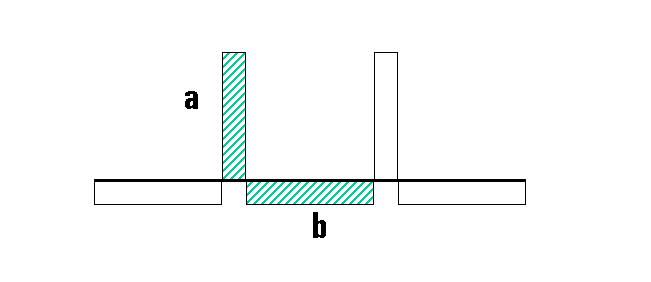
Assume the pulse train goes from 0V to +5V. Now we feed the pulse into an amplifier or a measuring device. If the device is DC coupled, the result will be a true representation of the pulse. But if the device (say an oscilloscope) is AC coupled, we will see the effect of the series capacitor on the pulse train.

The output will have equal areas (a=b) above and below zero volts:

Figure 1

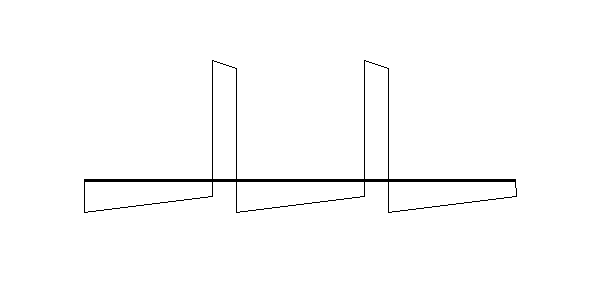
Also, if the repetition frequency is low compared with the time constant of the input circuit, we'll see some "droop" in the waveform, indicating the discharging of the input capacitor.

Figure 2

Risetime
You can see from the animation that as we add more and more harmonics, the sides of the pulses get steeper and steeper. This decreased rise time makes for a "better" pulse, but it is painfully clear that we'll need more bandwidth to make the pulse "perfect".

Pratical Considerations
It's not always wise to make the fastest pulse. A mechanical switch or a fast IC can cause a short rise time. That makes for a good pulse or step function, but it produces harmonics at very high frequencies-harmonics that can create radio frequency interference with sensitive circuits. That's the reason, for example, that airline pilots ask you to turn off electronic devices during takeoff--digital devices have fast rise times, and pilots are concerned about interference with the aircraft's navigation electronics.

Design engineers have to study the effects of "EMI" (Electromagnetic Interference) on their circuits and their designs have to pass international standards to make sure they don't interfere with other electronic devices. A high percentage of EMI problems can be directly related to fast rise-time pulses.

One of the lessons in this simulation is that engineering is comprised of a series of tradeoffs. If we want to design a "better" pulse train, we need to make practical compromises: How much bandwidth? How much EMI? What does an "acceptable" pulse waveform look like?